
Access administration
Administer accounts and access to each agent, from the first administrator, direct grants and offboarding to workflow identities and moving a hub from chat app groups to managed grants.
Hubzoid decides who may enter each agent and which restricted tools they may call. Day to day, administrators do this in the Console, which also creates and deletes accounts through the chat app. The hubzoid access, hubzoid grant and hubzoid revoke commands cover what has to happen on the server: creating the first administrator, scripting grants, moving an existing hub to managed grants, and recovering from a mistake.
When to use this
Use this page when you set up a new deployment, when you upgrade a hub that still grants tools through chat app groups, and when you need to inspect or repair access from a shell. For the model behind it (identities, surfaces and the tool check) read identity and access. For the Console screens read agents and access.
Grants
Access is stored as direct grants in the deployment's operational store. A grant is one row: a subject, a hub and a permission.
| Part | Values |
|---|---|
| Subject | A person's sign-in email. Older deployments can also hold legacy workflow identities (workflow:<name>, workflow:md:<task>) and a carried-over * for everyone signed in. |
| Hub | The hub's folder name, which is its access domain, or the organization domain for organization administrators (--org) |
| Permission | use_hub (enter the agent), manage_access (administer access), a built-in capability such as curator (Save shared knowledge), or the name of a restricted tool file, such as ledger for restricted/ledger.py |
The store enforces these rules on every write:
- Granting any tool permission also grants
use_hubin the same hub, so a grantee can always open the agent. - Revoking
use_hubremoves every permission that subject holds in that hub. - The organization domain accepts only
manage_access. - New grants to
*(everyone signed in) are refused by the Console, the API,hubzoid grantand the store. Only migration still carries one over from a legacy hub that was open to everyone. - The last organization administrator cannot be revoked, blocked, demoted or deleted.
use_hub and manage_access are reserved names, and connector_ is a reserved prefix. Built-in capabilities such as curator (Save shared knowledge), jev (Call Jev) and share_public_links (Share artifacts publicly) come with Hubzoid. Every other permission comes from a file in the hub's restricted/ folder. Optional labels, descriptions and a sensitivity flag for those restricted capabilities come from identity/permissions.yaml, which cannot relabel a built-in:
ledger:
  label: Read ledger
  description: Read accounting entries for this agent.
  sensitive: true
Sensitivity is only what this file says. Hubzoid never infers it from a name.
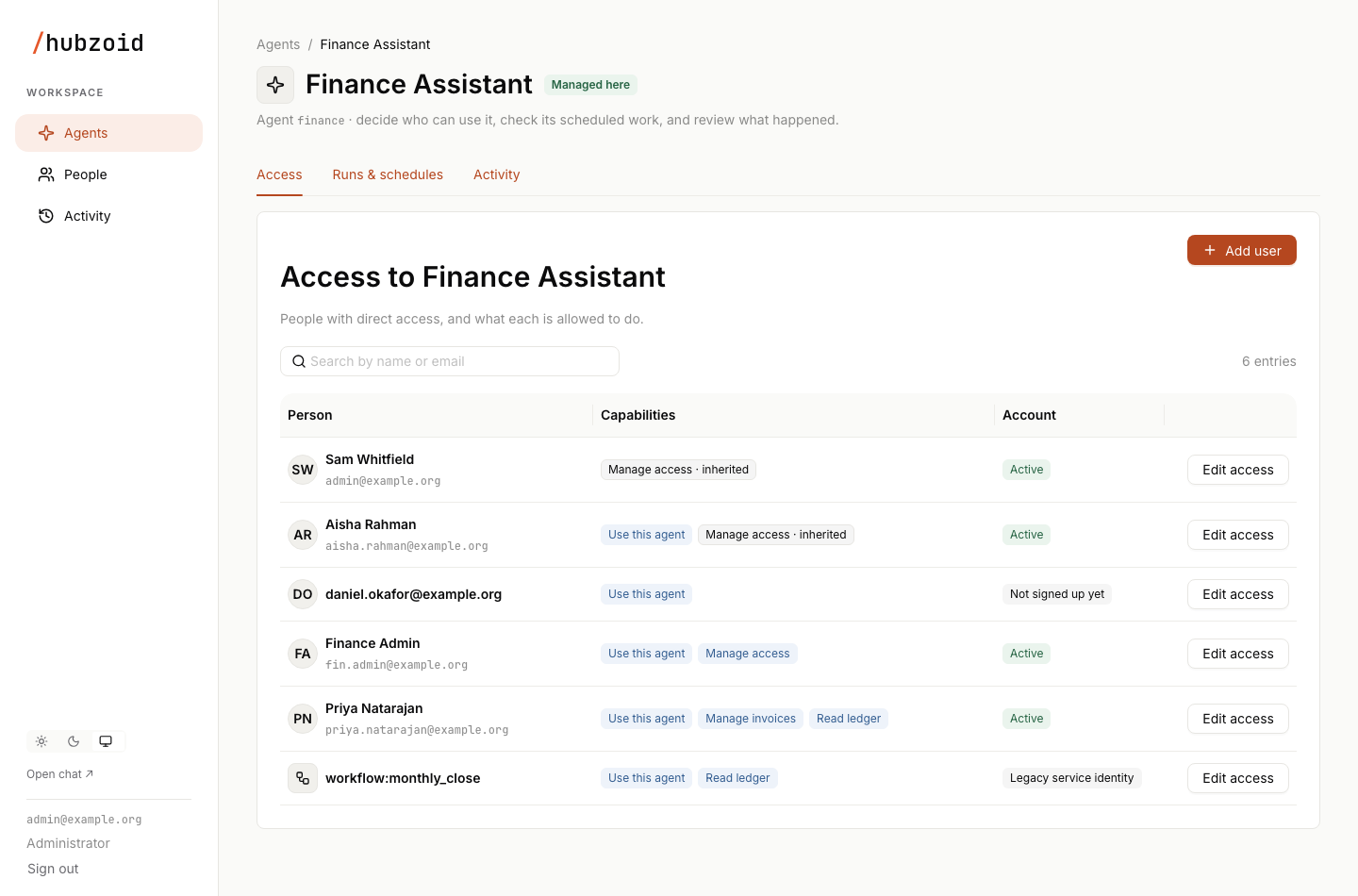
A person with manage_access in a hub is an agent administrator for that hub, and can also open and chat with it. A person with manage_access in the organization domain is an organization administrator for every hub, which does not by itself grant chat. In each agent they manage, an agent administrator grants or removes only capabilities they hold there themselves, never manage_access, and cannot change their own access or an organization administrator's. They can create a normal account with access in their agents, but cannot approve, reset passwords, change roles or delete accounts.
hubzoid grant also accepts an email that has no account yet. The access applies when someone first signs in with that email, for example through single sign-on. The management API can do the same. The Console cannot, because Add user always creates the account.
The first administrator
A chat app administrator is not automatically a Hubzoid administrator. Hubzoid provisions one configured owner: the account in HUBZOID_GATEWAY_ADMIN_EMAIL, else WEBUI_ADMIN_EMAIL, which must be a chat app administrator. The first time it signs in and opens the chat or /portal/, it receives organization administration and Use this agent in each hub, once, and hubs created with hubzoid init switch to managed grants. A later sign-in never restores access you revoke. On a local hub with sign-in off, the owner is admin@localhost.
For a headless setup or recovery, create the first administrator from the server instead. In a gateway, start the gateway first so its hubs are registered.
hubzoid access bootstrap --admin operator@example.com ./financeFor a hub with no earlier access setup to migrate, also make managed grants authoritative for it:
hubzoid access bootstrap --authoritative ./finance
hubzoid access bootstrap --authoritative ./operations
--admin can be repeated. Bootstrap grants administrators on its first successful run only, so it can never be used to add administrators later. Add further organization administrators in the Console: open the user under People and set Role to Administrator. Or on the server:
hubzoid grant second-admin@example.com manage_access --org ./financeA server grant sets only Hubzoid's side of the role, so People shows the person as Needs attention until an organization administrator chooses their role.
--authoritative refuses to run when the deployment would have no organization administrator, because nobody could then open the Console.
The administrator signs in to the chat app with the bootstrapped email and opens /portal/. For a hub that already grants tools through chat app groups, do not use --authoritative. Migrate it instead, as described below.
Accounts in the Console
The chat app keeps credentials. The Console creates and changes accounts through the chat app's admin API, as the service account in HUBZOID_GATEWAY_ADMIN_EMAIL and HUBZOID_GATEWAY_ADMIN_PASSWORD (a chat app administrator), on the chat app's internal address. Set both in the gateway's environment, or in a single hub's .env. Nothing is emailed, and every action is recorded in Activity.
| Action | Who | Where |
|---|---|---|
| Add user: a new account with its first access | Organization administrators, and agent administrators within their own access | An agent's Access page, or People |
| Change an existing user's access | The same | Edit access on their row, or People, the user, Edit access or Add an agent |
| Approve a pending sign-up, reset a password | Organization administrators | People, the user |
| Set Role to User or Administrator | Organization administrators | People, the user |
| Delete user | Organization administrators | People, the user, the … menu |
Add user takes a name, an email and a password you type or generate, shown once for you to share. Google sign-in only creates the account with no password when Google sign-in and OAUTH_MERGE_ACCOUNTS_BY_EMAIL=true are configured. See authentication. An email that already has an account changes nothing, and the Console links to that user so you edit their access instead.
Administrator sets Hubzoid organization administration and the chat app's admin role together, and User clears both. A change that applies on only one side is reported with Try again, and a user who is an administrator on only one side shows Needs attention.
Offboard someone
Use Delete user and type the person's email to confirm. It removes every grant, then deletes the chat account and its chats. Activity history, usage records and published artifacts are kept, the person's API keys stop working, and the email is marked as removed, so it inherits nothing. Only an organization administrator can create an account with that email again. The chat app keeps a deleted account's stored connection tokens in its database.
The Console no longer offers Block or Reactivate. A person blocked in an earlier release stays blocked and cannot be given new access. An organization administrator can unblock them through the management API with POST /portal/api/people/block and {"subject": "<email>", "suspended": false}. Unblocking does not restore the grants the block removed.
Hide the Open WebUI user list
A gateway set up fresh with Console accounts hides Open WebUI's user management and records that in deployment.json. Existing deployments keep it, so nothing changes on upgrade. HUBZOID_HIDE_OWUI_USERS=true or false, in the environment of the gateway or hubzoid run, overrides either. Set true on an existing deployment once account management in the Console works there.
When hidden, Open WebUI's user list opens People in the Console, and browser writes to its account admin API are refused. When every agent is managed in the Console, the Admin Panel's whole Users section, Groups included, opens Settings, Integrations instead. While any agent still uses chat app groups, Groups stays.
Workflow identities
Scheduled workflows and markdown tasks run as an ordinary account: run_as on the declaration or in the task's frontmatter, else HUBZOID_WORKFLOW_USER (the hub's, then the deployment's), else, on a hub managed in the Console, the owner recorded at setup. Grant that account the permissions the work needs, like any person. It must have signed in once and, on a managed hub, hold Use this agent. For shared automation, create an ordinary account such as reports@example.com. hubzoid schedule list <hub> and the Console's Runs as column show who each one runs as.
Grants to the older workflow:<name> and workflow:md:<task> subjects are kept, but runs that act as an account do not use them. When a run's account lacks a permission the old subject held, the run log names it. The Console lists these subjects as Legacy service identity and cannot add new ones. A legacy hub with no account configured keeps running under the old identity. To move over, grant the account and then remove the old grant:
hubzoid grant reports@example.com ledger ./finance
hubzoid revoke workflow:month_end_close ledger ./finance
Command reference
Every command takes the hub directory as its last argument (default: the current directory) and finds the operational store through the hub, including a gateway's shared store. grant and revoke print the store they write to, with any password hidden.
| Command | What it does |
|---|---|
hubzoid grant SUBJECT PERMISSION [HUB_DIR] | Grant one permission. --hub NAME targets another hub's domain, --org the organization domain. |
hubzoid revoke SUBJECT PERMISSION [HUB_DIR] | Revoke one permission. Same --hub and --org options. |
hubzoid access check SUBJECT [HUB_DIR] | Every permission the subject effectively holds in the hub. --hub NAME for another hub. |
hubzoid access list [HUB_DIR] | Every grant as subject, permission and hub. --hub NAME limits it to one hub. |
hubzoid access bootstrap [HUB_DIR] | First administrators (--admin, repeatable) and, with --authoritative, managed grants for this hub. |
hubzoid access migrate [HUB_DIR] | Build a plan from the hub's earlier access setup. A preview unless --apply. |
hubzoid access diff [HUB_DIR] | Compare a migration plan with the stored grants. |
hubzoid access sync [HUB_DIR] | Project grants into the chat app's model visibility. |
hubzoid access rollback BACKUP [HUB_DIR] | Restore a snapshot written by migrate --apply. |
hubzoid audit [HUB_DIR] | Recent tool decisions. See observability. |
Examples:
hubzoid grant priya@example.com ledger ./finance          # also grants use_hub
hubzoid grant reports@example.com ledger ./finance        # the account a workflow runs as
hubzoid access check priya@example.com ./finance
hubzoid revoke priya@example.com use_hub ./finance         # removes all of her finance permissions
hubzoid revoke '*' use_hub ./operations                    # removes a carried-over Everyone signed in grant
Changes take effect at the next permission check, in every bridge of the deployment. In a gateway, the chat app's model picker follows within about 30 seconds: the first hub's bridge projects grants into the chat app's model visibility on that interval. In every deployment, the edge also filters the picker by each signed-in person's entry grants, chat app administrators included, and a managed hub's bridge enforces use_hub on every request. A person with no agent yet sees a notice in the chat instead of an empty picker.
Group-based and managed access
A hub is in one of two states:
| State | Who may use restricted tools | Who manages it |
|---|---|---|
| Group-based | Members of a chat app group named after the permission, plus groups from the hub's identity/access.csv roster | Chat app groups, and MCP_ACCESS_GROUP for the MCP server |
| Managed | Subjects with a grant | The Console and the commands above |
Hubs created with hubzoid init become managed when the configured owner first signs in. Hubs created before managed grants, and hubs never bootstrapped as authoritative, are group-based. The Console shows them as using chat app groups and refuses permission edits for them, so nothing it shows is overwritten elsewhere. It can still create accounts on such a deployment. Once a hub is managed, access checks never fall back to groups, even when the store is unreachable. They deny instead.
Move a hub to managed grants
Migration flattens a hub's existing access (chat app groups, the CSV roster and the chat app's model visibility) into direct grants, proves the result matches, and switches the hub over in one transaction. Migrate one hub at a time and rehearse on a copy of the deployment first.
- Back up
- Preview
- Apply
- Diff
- Sync
- Verify
Prepare
Have to hand: the chat app database for the hub (a SQLite path, or a PostgreSQL URL), the hub's chat app model id, the gateway service account in HUBZOID_GATEWAY_ADMIN_EMAIL and HUBZOID_GATEWAY_ADMIN_PASSWORD, and the emails of the people who will administer access.
The model id is the gateway's model label for the hub, which can differ from the folder name. For a hub registered in a gateway, the command reads it from the manifest and refuses a --model-id that disagrees.
If the hub resolves its roster with identity/access.py, export it to identity/access.csv and remove the function first. Computed permissions cannot be enumerated safely.
Also confirm whether people are onboarded by adding them to a chat app group. After migration, new group members need an explicit grant instead.
Stop the writers
Stop every bridge, which also stops the visibility sync, and freeze access edits. Keep the chat app reachable on loopback, because access sync and access rollback call its API. Set the service account variables in your shell so the commands can sign in.
Back up
hubzoid backup ./finance --out /var/backups/pre-migration.tar.gzFor PostgreSQL, also run pg_dump. The full backup is your baseline, and it holds the original model visibility before any sync. See backup and restore.
Establish administrators
hubzoid access bootstrap --admin admin@example.org ./financeMigration never turns legacy groups into administrator rights.
Preview
hubzoid access migrate ./finance \
  --from-owui sqlite:////srv/hubzoid/gateway-data/webui.db --model-id finance
The preview prints the number of grants, any conflicts, and the result of a before and after check covering both permitted and denied people: how many legacy decisions it checked and every difference. Any difference ends the command with exit code 2. A CSV-only preview warns that model visibility is unverified, and --apply refuses such a plan.
If the hub was open to every signed-in person, the report says Everyone signed in (carried over). The agent's Access page then shows an Everyone signed in row that keeps working. Give the people who need the agent named access, then an organization administrator selects Remove on that row.
Apply and confirm
hubzoid access migrate ./finance \
  --from-owui sqlite:////srv/hubzoid/gateway-data/webui.db --model-id finance --apply
hubzoid access diff ./finance \
  --from-owui sqlite:////srv/hubzoid/gateway-data/webui.db --model-id finance
--apply writes a snapshot to <hub>/.hubzoid/backups/access-<id>.json (mode 0600), then writes the grants and switches the hub in one transaction. It requires zero missing and zero extra grants afterwards and exits 1 otherwise. Run diff straight away and expect 0 missing, 0 extra. Run it before sync, because sync rewrites the chat app visibility that diff reads as its baseline.
Project visibility
hubzoid access sync ./finance
hubzoid access sync ./finance
The first run replaces the chat app's model visibility with per-person grants. The second should report state ok and change nothing, which shows the projection converged.
Restart and verify
Start the gateway and bridges again. Check that an administrator sees the hub as editable in the Console, that a permitted person can enter the agent and use its tools, that a denied person cannot, and that people without restricted tools still chat normally.
Migrate options
Prop
Type
access diff takes the same --from-owui, --model-id and --standalone-public options. The importer reads the current chat app schema and the older schemas it knows, refuses unknown ones, and refuses disabled models rather than enabling them.
Roll back
If a hub fails verification, keep the bridges stopped and the chat app running, then restore the snapshot --apply printed:
hubzoid access rollback /srv/hubs/finance/.hubzoid/backups/access-1727251200000000000.json ./financeRollback restores that hub's grants, attributes and previous state, and, for a migration made with --from-owui, the original model visibility through the chat app's API. It refuses a snapshot taken from a different hub. If the chat app cannot be reached, it reports a partial restore and exits with an error: keep the window open, fix the connection, and run the same command again. A snapshot without saved visibility tells you to restore model access from your full backup. Rollback never changes chat app accounts.
Troubleshooting
| Symptom | Check |
|---|---|
| A grant has no effect | The hub is still group-based, the command used the wrong hub directory, or the grant's email differs from the sign-in email. |
| An agent does not appear in the model picker | Run hubzoid access sync <hub>, and check the service account variables and the People screen's sync status. |
| The Console refuses entry | The session is not a chat app session, or the person lacks manage_access. |
| Someone keeps access after a revoke | The agent still has a carried-over Everyone signed in row, or they are an organization administrator. Offboard with Delete user. |
hubzoid grant '*' ... is refused | New access for everyone signed in cannot be created. Grant named people. |
| Add user says account management isn't set up | Set HUBZOID_GATEWAY_ADMIN_EMAIL and HUBZOID_GATEWAY_ADMIN_PASSWORD for a chat app administrator. |
| A person shows Needs attention | They are an administrator in only one of Hubzoid and the chat app. Choose their Role under People. |
| A workflow run fails with no account to run as | Set run_as or HUBZOID_WORKFLOW_USER, and check that the account has signed in once and holds Use this agent. |
migration blocked | Read the reason. Common causes are a --model-id that does not match the registered hub, and --standalone-public on a hub registered in a gateway. |
Next steps
Authentication
Configure sign-in for the chat app and the Console with email and password, Google, Microsoft, GitHub, OIDC, LDAP or a trusted proxy header, and manage accounts in the Console.
Security model
How a Hubzoid deployment is protected, covering network exposure, sign-in, fail-closed authorization, secrets, MCP keys, data locations and egress.