
Runs
Follow an agent's workflow and scheduled task runs in the Console, see who each workflow runs as and what managers can see, read each run's steps, and see which actions stay in the CLI.
The Console shows every run of your agents' code workflows and markdown tasks, read straight from the workflow engine's own history. Runs and schedules live inside each agent, on its Runs & schedules tab. The Console is read only for runs. Starting, pausing, resuming and cancelling happen on the server with hubzoid schedule.
When to use this
Check that scheduled work fired after a deploy, find which step failed and why, see which account a workflow acts as, or answer "did the monthly close run last night?" without opening a terminal. How workflows and tasks are written and scheduled is covered in Workflows and schedules. Day-to-day operation from the server is in Operating runs.
An agent's Runs & schedules tab
Open Agents, then the agent, then Runs & schedules (#/agents/<key>/runs). The tab, headed "Workflows in" and the agent's name, lists the agent's code workflows and markdown tasks with their current state. A line above the table shows the scheduler's last dispatch and how many runs were missed. Refresh reloads the list.
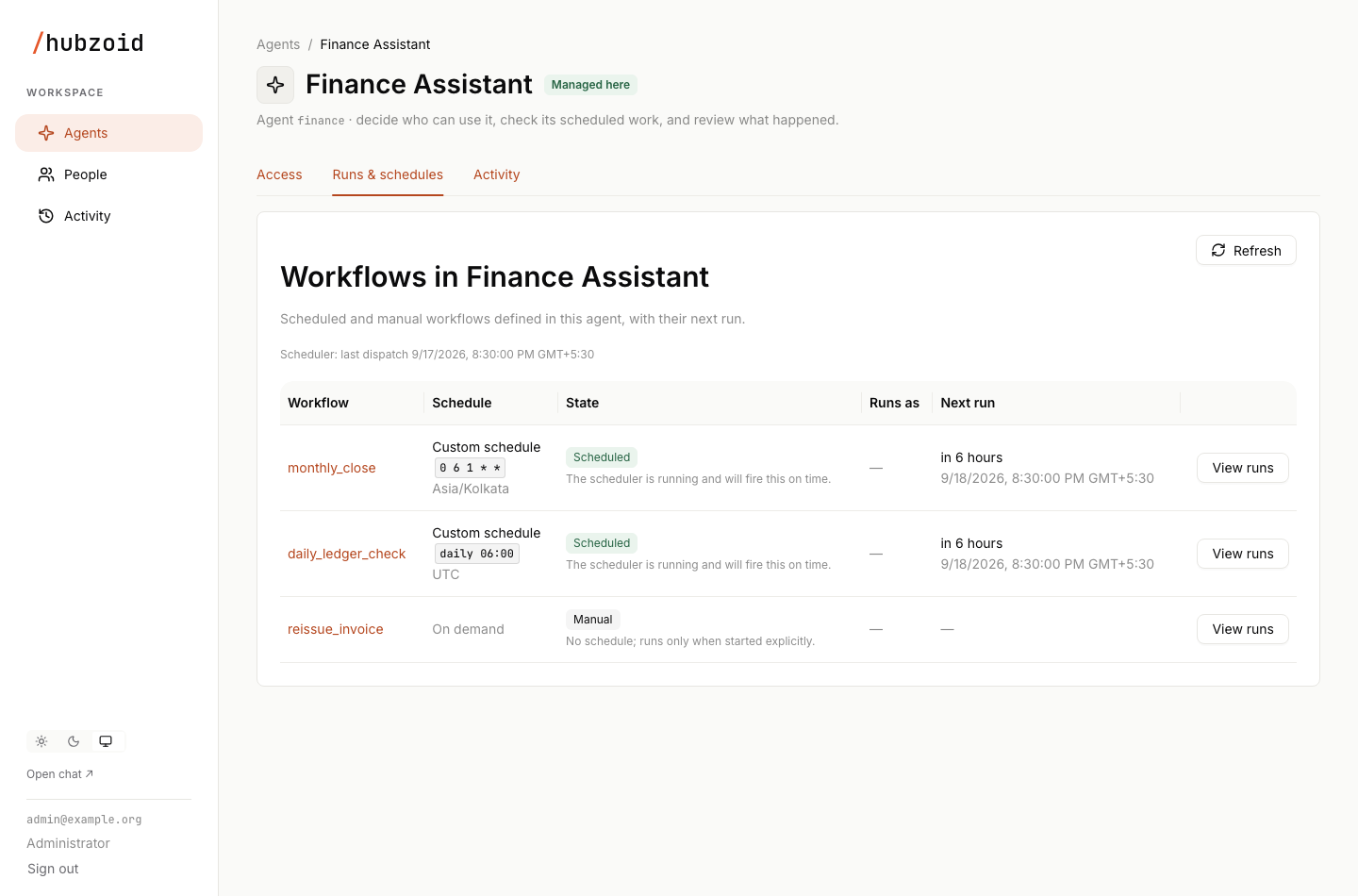
| Column | Contents |
|---|---|
| Workflow | The name, with the load error underneath if it has one. Opens the workflow's runs |
| Schedule | A plain reading such as "Daily at 08:00" or "Custom schedule", the schedule as written and its timezone. Markdown tasks show "server local time", and webhook tasks show on webhook with the endpoint name. A workflow with no schedule reads "On demand" |
| State | A state tag with a short explanation |
| Runs as | The account the workflow's runs act as, and where that setting came from, such as "its run_as" or "the setup default (the initial owner)". When no usable account can be found, it reads "Cannot run" with the reason |
| Next run | When it fires next, if it is scheduled |
| View runs |
| State | Meaning |
|---|---|
| Scheduled | The scheduler is running and will fire it on time |
| Manual | It has no schedule and runs only when started explicitly |
| On webhook | A markdown task that runs when its webhook receives an event |
| Paused | An operator paused its schedule with hubzoid schedule pause. Resume it on the server |
| Schedules off | Schedules are off for this deployment |
| Disabled in file | A markdown task that its own file disables. Enable it there when it is ready |
| Scheduler stopped | The dispatcher has sent no heartbeat in the last 150 seconds, so scheduled runs will not fire until the bridge restarts |
| Definition error | The workflow or task could not be loaded |
Three alerts can appear above the table: the scheduler is not running, scheduled runs were missed while it was down (these are not back-filled), or a workflow could not be loaded, with the error.
Who a workflow runs as
Every scheduled workflow and markdown task runs as an ordinary account. The first match wins: run_as on the @workflow decorator or in the task's frontmatter, then HUBZOID_WORKFLOW_USER in the hub's configuration, then in the deployment's, then, on a hub managed in the Console, the owner recorded at setup (admin@localhost for a local quickstart). The Runs as column and hubzoid schedule list use this same resolution.
That account must have signed in at least once, must not be awaiting approval or blocked, and needs Use this agent on a managed hub, plus the capabilities its tools require. Grant them on the agent's Access tab like anyone else's. Hubzoid never falls back to another account. A hub that still uses legacy access and has no account configured keeps its legacy service identity, workflow:<name> or workflow:md:<task>, which the column shows as "the legacy service identity". See who a run acts as.
A workflow's runs
View runs, or the workflow's name, opens its runs at #/agents/<key>/runs/<workflow>, most recent first, headed "Runs of" and the workflow's name. The columns are Run (the run id), Status, Started, Duration, Runs as and Result, which shows the run's output, its error in red, or "Private to" and the account when the result belongs to someone else. Runs are shown 50 per page.
Names in the Workflow column follow one pattern:
| Name | What ran |
|---|---|
monthly_close | A code workflow, by its @workflow function name |
md:nightly-ledger-check | The markdown task in schedule/nightly-ledger-check.md |
evals | A scheduled eval run |
What managers can see
The people who manage an agent see each run's workflow, status, timing, the account it acted as, and a failure summary. What a run produced belongs to that account. Its result and each step's output are shown only when you are signed in as the account the run acted as. Everyone else sees "Private to" and the account in their place.
For a failed run, others see only the kind of error, with a note that the details are visible to the account the run acted as. Hubzoid's own configuration errors are the exception and are shown in full, because they name settings rather than data. Organization administration or Manage access alone never reveals a person's run results. Runs of a legacy service identity act for no person, so managers see their detail as before. On the server, hubzoid schedule status shows results in full, because whoever runs it can read the workflow database anyway.
A run's details
Select a run to open it at #/agents/<key>/runs/<workflow>/<run-id>.
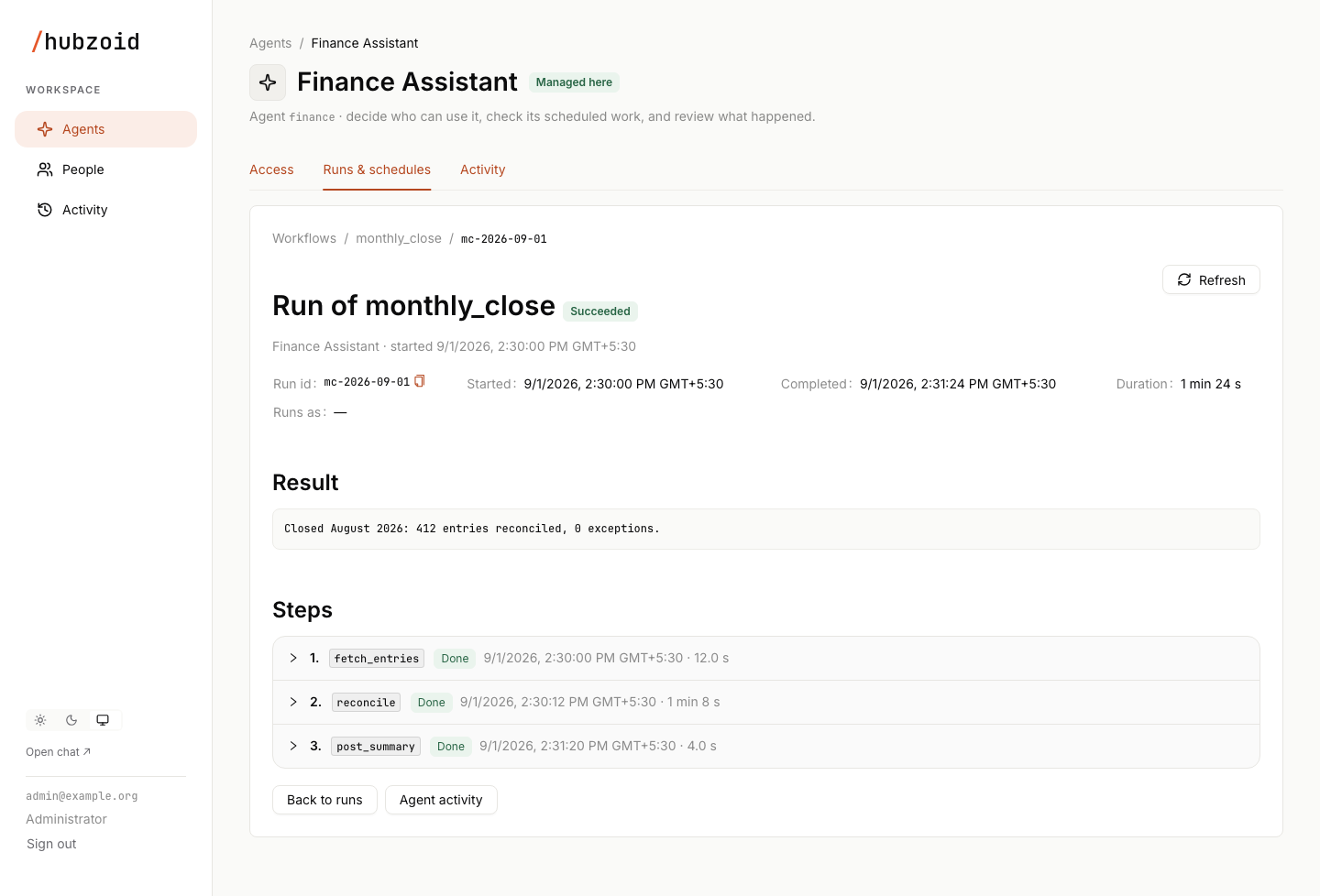
- The header shows "Run of" and the workflow name, the status tag, the agent and the start time.
- Run id, Started, Completed, Duration and Runs as follow. Times are shown in your browser's timezone with the zone name.
- Result shows the run's output. A failed run shows "The run failed" with the error. A result that belongs to another account says it is private to that account. A run that is still going says so.
- Steps lists each recorded step in order, with the step's function name, a Done or Failed tag, its start time and duration. Expand a step to read its output or error, or the note that it is private. The step that records who the run acted as is always shown.
- Back to runs and Agent activity lead on from here.
Run output and errors are shown up to 8,000 characters, and each step's output or error up to 4,000. A run id that is not in this agent's history, for example a link from another deployment, shows "Run not found" with a way back to the runs list.
Runs across agents
The cross-agent runs list no longer has a sidebar entry, but #/runs still opens it, so older links keep working. Headed "Runs across your agents", it lists every run from the agents you manage, newest first by the time the run was created.
| Filter | Options |
|---|---|
| Agent | All agents, or one agent |
| Status | Any status, Running, Succeeded, Failed or Cancelled |
| Time range | Any time, Last 24 hours, Last 7 days or Last 30 days |
| Run id | One exact run id |
| Auto-refresh | Reloads the list every 10 seconds |
Reset filters clears them and Refresh reloads immediately. Runs are shown 50 per page. Filtering and paging happen on the server, so a page is always a page of the filtered result.
A time range works in one of two ways. With auto-refresh off, choosing a range fixes its start and end times in the page address, so the link shows the same runs later and newly arriving runs do not shift the pages you are reading. With auto-refresh on, the range slides forward with the clock. Turning auto-refresh off freezes the window where it is.
The columns are Agent, Workflow, Run, Status, Started, Duration and Result. Selecting a run opens its details inside its agent. If a background refresh fails, the page keeps the runs it already loaded and says it could not refresh. If the run history cannot be read at all, the page shows the error with Try again, and the API answers 503.
Statuses
The Console translates the workflow engine's states into a small set of labels. The Status filter groups them into four buckets.
| Engine state | Label | Status filter |
|---|---|---|
SUCCESS | Succeeded | Succeeded |
ERROR | Failed | Failed |
MAX_RECOVERY_ATTEMPTS_EXCEEDED | Gave up | Failed |
PENDING | Running | Running |
ENQUEUED | Queued | Running |
CANCELLED | Cancelled | Cancelled |
Gave up means the engine stopped trying to recover an interrupted run after repeated attempts. Other engine states, such as DELAYED, appear under their own name in lowercase. GET /portal/api/runs also accepts engine state names in its status parameter, for example status=ENQUEUED. An unrecognized status value is refused with 422 instead of being ignored, because ignoring it would widen the query to every run.
What stays in the CLI
The Console never changes a run. Every control happens on the server, where the person acting is the operating system account that runs the command.
| Action | Command | Behavior |
|---|---|---|
| Start now | hubzoid schedule run ./finance monthly_close | Fires one workflow or task immediately, ignoring its schedule |
| Pause a schedule | hubzoid schedule pause ./finance monthly_close | Stops scheduled runs until resumed. Queued and running runs continue, and manual runs still work |
| Resume | hubzoid schedule resume ./finance monthly_close | A markdown task that became due while paused runs once. Code workflows do not back-fill |
| Cancel a run | hubzoid schedule cancel ./finance <run-id> | Only a queued or running run. It stops at its next step boundary, and work already done is not undone |
| Inspect | hubzoid schedule list ./finance, hubzoid schedule status ./finance | Cadence, next fire times, who each workflow runs as and recorded history |
Pause, resume and cancel are recorded in Activity, Access changes, as sentences such as "paused the monthly_close workflow in Finance Assistant", with the actor shown as a server operator and the account and host that ran the command. Filter by the actions Paused a workflow, Resumed a workflow and Cancelled a run. A paused workflow shows Paused on its agent's Runs & schedules tab.
Where the data comes from
Runs come from the workflow engine's system database: a SQLite file per hub at .hubzoid/dbos.db, or PostgreSQL when the deployment configures it. Hubzoid keeps no second copy of run history. The Console reads it through GET /portal/api/workflows and GET /portal/api/runs, limited to the agents you manage and, for results, to the account each run acted as. The cross-agent list merges each agent's history by creation time, so paging stays consistent across agents.
Next steps
Operating runs
Pause, resume, cancel, drain and troubleshoot scheduled work on the server.
Workflows and schedules
How markdown tasks and code workflows run on one durable engine, and who they run as.
Code workflows
Write exact, durable steps in Python with @workflow and @step.
People and activity
Read run controls and access changes in the activity record.
Agents and access
The Console's agent cards and agent pages, and how to add users, grant capabilities in grouped sections, handle sensitive grants, replace an old Everyone signed in grant and save changes atomically.
People and activity
The People page and account statuses, a user's details with their role, password and access by agent, approving sign-ups, deleting users, and how to use the two Activity records for audits.