
Operating runs
Inspect, start, pause, resume and cancel scheduled work, read run status in the Console, drain before deploys and fix common scheduling problems.
Markdown tasks and code workflows share one run history and one set of controls. The controls are hubzoid schedule commands on the server, and every pause, resume and cancel is recorded in the access audit. The Console shows runs, schedules, health and that audit.
When to use this
Use this page when you operate a hub that runs scheduled work: to see what ran, start something now, stop a schedule during an incident, cancel a stuck run, prepare a deploy or a backup, or work out why a run did not happen.
Commands
| Command | What it does |
|---|---|
hubzoid schedule list [hub] | Every markdown task and code workflow with its trigger, state, next run and the account it runs as, or why it cannot run. Exits 1 when a task file is invalid. |
hubzoid schedule status [hub] | Each workflow's state, next run and missed count, the 20 most recent runs with status, duration and error, and each markdown task's fire history. |
hubzoid schedule run <hub> <name> | Queues one run now and waits for its result. |
hubzoid schedule pause <hub> <name> | Stops scheduled runs of one task or workflow until resumed. |
hubzoid schedule resume <hub> <name> | Resumes scheduled runs. |
hubzoid schedule cancel <hub> <run-id> | Cancels a queued or running run. |
list and status default to the current folder. <name> is a markdown task name, with or without the md: prefix, or a code workflow's function name, where hyphens are read as underscores. Markdown task names are matched first. Run ids come from hubzoid schedule status or the Console. The full option list is in the CLI reference.
Run now
hubzoid schedule run queues the run on the same queue a scheduled run would use, so it never overlaps one, and it ignores the schedule, pauses and the chat gate. For a markdown task it accepts --timeout, --max-rounds, --model and --dry-run, as described in Markdown tasks. For a code workflow, --dry-run names the file it would run without executing any code, and the other three options are refused because those limits live in the workflow code. The command prints the result and exits 0 on success, 1 when the run failed or ended incomplete, and 2 when the name is unknown or the definition does not load.
Pause and resume
A pause is stored in the operational database, so every bridge on a shared database sees it. The scheduler reads pauses again right before it queues each run, so a pause that lands mid-tick still stops the next dispatch.
- Runs already queued or running continue. Cancel them if they must stop.
- Manual runs of a paused task or workflow still work.
- On resume, a markdown task that became due while paused runs once, the same catch-up as after downtime. A code workflow runs at its next slot without backfill.
Cancel
hubzoid schedule cancel my-hub md:weekly-count-summary:20260928T0717Only a run that is queued or running can be cancelled. For any other run the command reports its status and does nothing. A queued run is cancelled before it starts. A running run stops at its next step boundary. Work already done is not undone: a message that was sent, a git push or a script's effects stay.
Audit attribution
Each pause, resume and cancel is written to the access audit, with the operator recorded as cli:<user>@<host>, the account that ran the command on the server. The Console's Activity page shows these entries, for example "cli:ops@hub-01 paused the weekly-count-summary schedule in my-hub". Run controls act with the authority of whoever can run commands on the server. The Console shows paused work and the audit, and has no run buttons.
Read runs in the Console
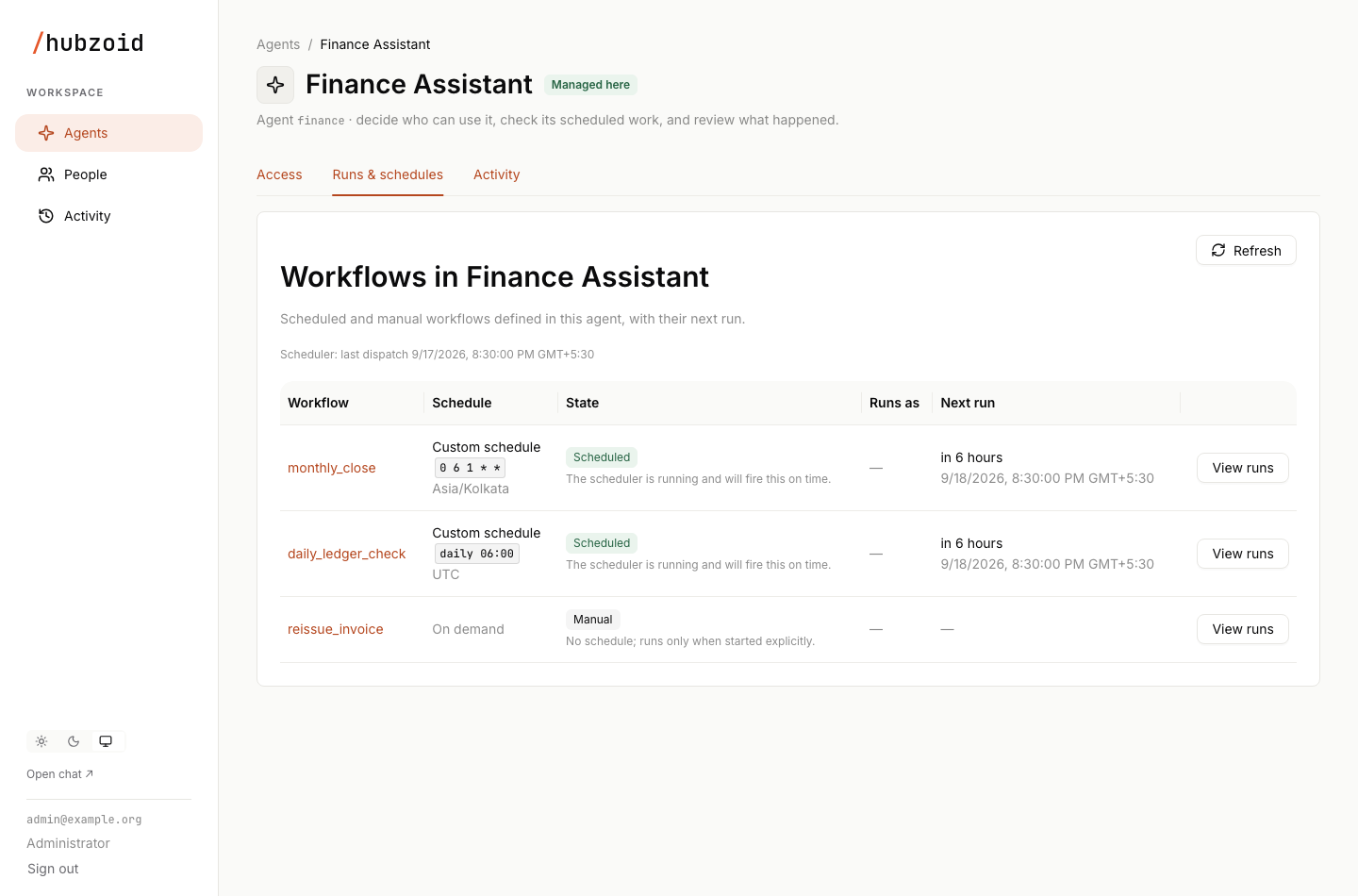
Runs and schedules live inside each agent. On the agent's Runs & schedules tab, open a workflow with View runs to list its runs, newest first, with status, start time, duration, Runs as and result. Existing links to the cross-agent list from earlier releases still open Runs across your agents, which filters by agent, status, time range (24 hours, 7 days or 30 days) or run id, reloads every 10 seconds with auto-refresh, and keeps its filters in the URL.
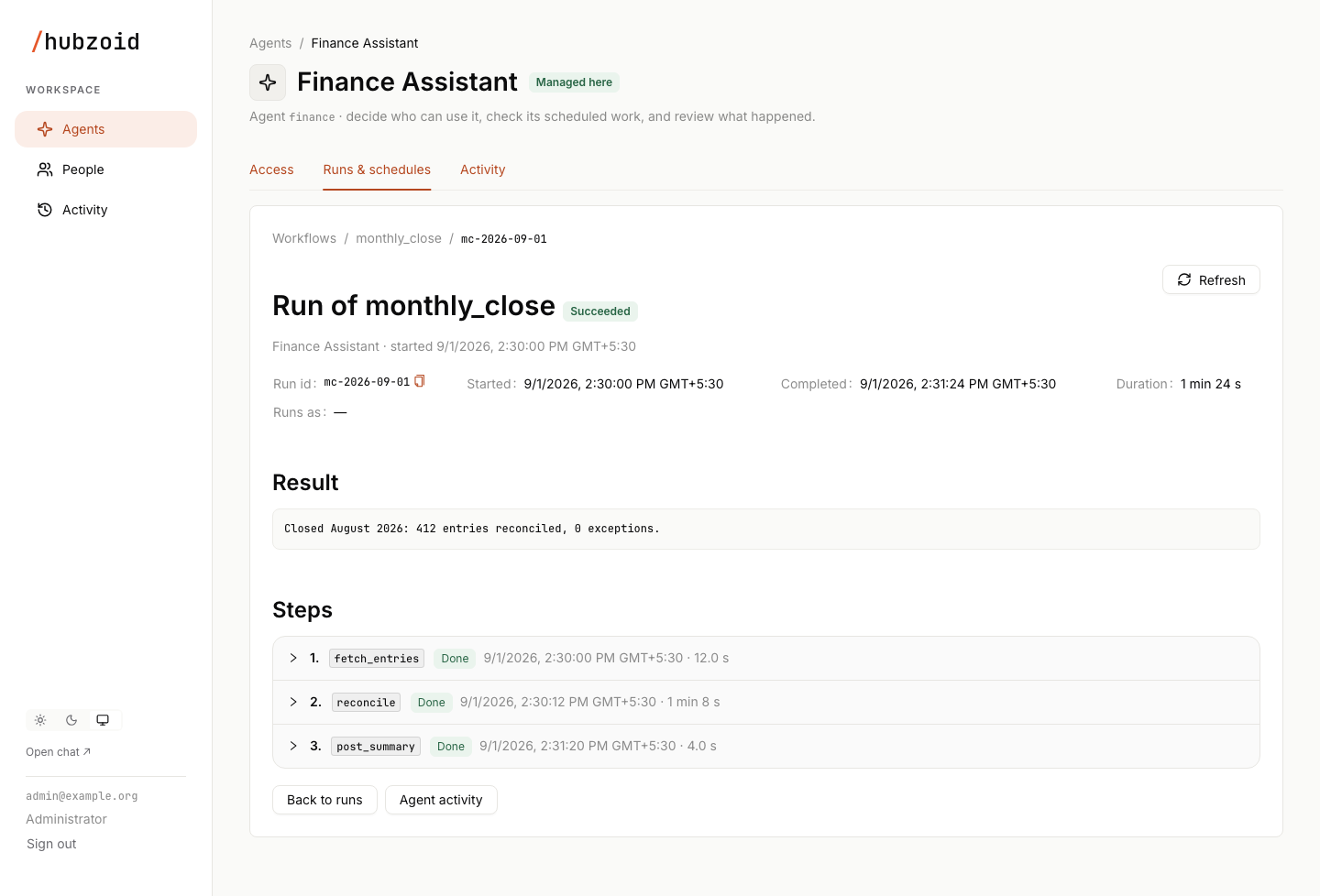
Open a run to see its id, start and completion times, duration, the account it ran as, its result or the error that failed it, and each step with its own output or error. The first step records the account. A markdown run then shows its work step, its commit and push steps when they ran, and its finish step. A code workflow run shows your @step functions, model calls, publishes and emails.
A run's result belongs to the account it acted as. The hub's managers see its workflow, status, timing and a failure summary, while the result, step outputs and detailed errors read as private to that account. A legacy service run, which acts for no person, stays fully visible to managers. hubzoid schedule status on the server shows everything.
| Console label | Engine status | Meaning |
|---|---|---|
| Queued | ENQUEUED | Waiting for a slot in its queue. |
| Running | PENDING | Started and not finished. A run interrupted by a stop stays here until the hub starts again and resumes it. |
| Succeeded | SUCCESS | Finished. A markdown run that ended incomplete shows here too, with incomplete in its result. |
| Failed | ERROR | The run raised an error, including a markdown run that ended error. |
| Gave up | MAX_RECOVERY_ATTEMPTS_EXCEEDED | The engine stopped trying to recover the run. |
| Cancelled | CANCELLED | Cancelled by an operator, or at start because the workflow code changed. |
The Running status filter covers both queued and running runs.
Each agent's Runs & schedules tab lists its workflows and markdown tasks (as md:<task>) with schedule, timezone, state, Runs as and next run, and a line with the last dispatch and missed runs. Runs as names the account and where it came from, or says Cannot run with the fix.
| State | Meaning |
|---|---|
| Scheduled | The dispatcher is running and will fire it on time. |
| Manual | No schedule. It runs only when started. |
| On webhook | A markdown task that runs when its webhook receives an event. |
| Paused | An operator paused it. Resume it on the server. |
| Disabled in file | A markdown task with enabled: false. |
| Schedules off | Code workflow schedules are not enabled on this deployment, or HUBZOID_DISABLE_SCHEDULE stops markdown tasks. |
| Scheduler stopped | Schedules are enabled but no dispatcher heartbeat has arrived for 150 seconds. |
| Definition error | The file could not be loaded. The error is shown under the name. |
Banners on the tab flag a stopped scheduler, slots missed while the scheduler was down and a workflow that could not load. See Console runs for the full screens.
Missed slots
- Markdown tasks catch up once after downtime or a pause. The catch-up run records how many extra slots it stood in for in the task's
missed_login.hubzoid/schedule-state.json, kept for 31 days. - Code workflows never backfill. When the dispatcher falls behind, or a backup hold ends, it runs only the latest due slot and counts the earlier ones as missed. When the hub starts more than 90 seconds after the last heartbeat, it counts the slots that fell in the gap, logs a warning and shows a banner in the Console. Dated records are kept for 31 days.
- Each agent's Runs & schedules tab shows missed code workflow runs beside the last dispatch, and
hubzoid schedule statusprints a missed count per workflow. The Console's summary API (/portal/api/summary) adds both kinds into a missed-slots figure per agent for the chosen period.
Concurrency limits
Markdown tasks run one at a time per hub. Each code workflow runs one at a time, and different workflows run side by side. To cap how many code workflows run at once in a hub, set max_concurrent_workflows: N in workflows/settings.yaml and restart the hub.
A code workflow slot that comes due while the previous run is still going waits in the queue and runs after it. If a workflow regularly takes longer than its interval, runs pile up behind each other, so choose an interval longer than a typical run.
Drain before a deploy
Runs belong to the code that started them: a hash of the installed Hubzoid version and every workflows/**/*.py file. When the hub starts under a different version, runs that were queued or interrupted under the old code are cancelled so they cannot block a queue, and show as CANCELLED. Markdown runs that were queued but not started are queued again under the new code, with :requeued added to the id.
At shutdown, runs in flight get up to 5 seconds to finish. Anything still running stays recoverable and resumes at the next start if the code has not changed. To avoid cancelled runs, drain first:
Stop new runs
Pause the schedules you are about to change with hubzoid schedule pause, or pick a moment between slots.
Wait for the queue to empty
Run hubzoid schedule status <hub> until no run is PENDING or ENQUEUED. Cancel any you do not need.
Deploy and restart
Deploy the change or upgrade Hubzoid, then restart the hub or gateway. See Upgrading.
Resume and catch up
Resume what you paused. If a cancelled run is still needed, start a fresh one with hubzoid schedule run.
Backup holds
hubzoid backup holds new scheduled runs for every hub in the deployment while it copies, and chat keeps working. It waits for running runs to finish first, for up to --wait seconds (default 600). If runs are still going when the wait ends, the backup stops with Scheduled runs are still in progress and names them. Try again later, cancel them, or pass --wait 0 to take the backup anyway.
When the backup ends, the hold is released. Due markdown tasks then run once, and each code workflow runs the latest slot that fell inside the hold. A hold also expires on its own if the backup process dies. While a hold is active, hubzoid doctor warns in scheduler.health. See Backup and restore.
Health checks
hubzoid doctor <hub> reads without changing anything. Add --json for stable check ids.
| Check | Reports |
|---|---|
schedule.tasks | Every schedule/*.md parses, or which files are invalid and why. |
workflows.definitions | Every code workflow loads, with its schedule and timezone. |
scheduler.health | A backup hold, a failed dispatch, a dispatcher with no recent heartbeat, or paused work. |
deps.sqlite | The workflow engine can run on this Python's SQLite. |
See the doctor reference for every check.
Troubleshooting
| Symptom | Cause | Fix |
|---|---|---|
| A code workflow never runs on schedule and shows Schedules off | Code workflow schedules are not enabled on this server | Set HUBZOID_SCHEDULES=1 in the hub's .env and restart, or run under hubzoid gateway. |
| The tab shows Scheduler stopped | The hub process stopped or crashed, so the dispatcher sends no heartbeat | Restart the hub. Slots missed meanwhile are counted, not backfilled. |
| Definition error on a workflow | Syntax error, duplicate function name, unknown schedule phrase or timezone, or a schedule that is not a string literal | Run hubzoid doctor <hub> and fix the file named in workflows.definitions, then restart. |
| A new markdown task has not run yet | A new task first runs at its next future cron match | Run it now with hubzoid schedule run <hub> <task>. |
| The first markdown task never fires on a running hub | The scheduler starts only when the hub starts with a task or scheduled eval | Restart the hub after adding the first task. |
| A markdown task is due but does not start | The hub is answering chat, the task is paused, a backup holds runs, or HUBZOID_DISABLE_SCHEDULE is set | Wait for a quiet tick, resume it, let the backup finish, or remove the variable and restart. |
schedule list prints a red problem and exits 1 | A task file is invalid | Fix the file. The message says what is wrong. Other tasks keep running. |
A markdown run ends incomplete | It reached max_rounds or kept timing out without STATUS: DONE | Raise timeout or max_rounds, or make the body save progress in the state file and name a clear done condition. |
A run failed with interrupted by a restart | The hub stopped during the work step, which is never repeated | Nothing. The next slot runs the task. Start one now with hubzoid schedule run if needed. |
| An outside system received the same change twice | A code workflow step was interrupted and ran again on resume, which is at-least-once delivery | Make the step idempotent: a key the system deduplicates on, a check before writing, or a per-item marker in hub.state. |
| Runs show Cancelled after a deploy | They were queued or interrupted under the previous workflow code | Drain before deploys. Start a fresh run if one is still needed. |
git pull --rebase failed in a run's error | The remote moved and the rebase conflicted | Resolve on the server by hand. The commit is local and nothing was pushed. |
is not inside a git repository | The task declares commit: but the hub is not in a git checkout | Initialize or clone the repository, or use write: instead of commit:. |
A run fails with has no account to run as | No run_as, no HUBZOID_WORKFLOW_USER, and no owner recorded at setup | Add run_as, set HUBZOID_WORKFLOW_USER in the hub or deployment configuration, or sign in once as the configured owner. |
A run fails with no signed-in account exists for that email | The configured account has never signed in | Create the account, or have that person sign in once. Or change the configured account. |
A run fails with awaiting approval, blocked or was replaced, or has no access to hub | The configured account cannot be used | Approve the account, choose another account, or grant it Use this agent. Hubzoid never falls back to another account. |
| A restricted tool is refused inside a run | The account the run acts as has no grant for that tool | Grant the permission to that account in the Console or with hubzoid grant, or point run_as at an account that holds it. Grants to the legacy workflow:<name> and workflow:md:<task> identities are not used. See Restrict tools. |
| A run shows its result as private | Results belong to the account the run acted as | Sign in as that account, or read it with hubzoid schedule status on the server. |
ModelOutputError fails a code workflow | The model's reply was not JSON matching the requested shape | Tighten the prompt or the Pydantic model. In code, the raw reply is in the exception's raw attribute. |
| Every code workflow run fails at start | workflows/settings.yaml is not valid YAML or not a mapping | Fix the file. It is read at the start of each run. |
| The engine does not start on Python 3.12 | The Python build links SQLite older than 3.42 (deps.sqlite fails) | Use a Python build with a newer SQLite, such as python.org, Homebrew, Debian 13 or Ubuntu 24.04, or PostgreSQL. |
hubzoid backup stops with Scheduled runs are still in progress | Runs did not finish within --wait | Try later, cancel the runs, or pass --wait 0. |
A webhook delivery gets 403 | The secret or signature does not match | Check WEBHOOK_INBOUND_SECRET and whether WEBHOOK_INBOUND_HMAC matches the sender. See Webhooks. |
| Webhook events are stored but no task runs | The task's on_webhook: name differs from WEBHOOK_INBOUND_NAME, or the task is disabled or paused | Make the names match, enable or resume the task. |
Next steps
Webhooks
Receive signed webhook deliveries from alerting, CI or other services, and run a markdown task that handles exactly the events it claimed.
Restrict a tool
Put a sensitive tool behind a permission, keep its credentials in restricted/.env, grant it to people and workflow accounts in the Console or CLI and confirm every call in Activity.