
Connect an assistant
Connect Claude Code, Codex, Hermes or another MCP client to the Hub with a personal API key, and control which instructions and tools it receives.
A hub can serve its instructions, knowledge and tools to the AI assistant a person already uses. The assistant brings its own model and subscription. The Hub supplies the shared context and the tools that person is allowed to use, under the same access rules as chat.
Compared with chat, an MCP call skips the Hub's runtime and model.
Chat: the Hub runs the model
The Hub agent reasons with the model set for the Hub and calls tools until it can answer.
Person
Web chat, Slack or the API
Bridge
/v1Checks who is asking
Runtime
Runs the agent
Model
Reasons and asks for tools
Tools
Run in the bridge
MCP: the assistant brings its own model
The assistant does the reasoning. The Hub checks the key, lists the tools this person may use and runs the ones called. It spends no model tokens and keeps no conversation.
Assistant
With its own model
Bridge
/mcpChecks the key and access
Runtime
Not used
Model
Not used
Tools
Results go back to the assistant
When to use this
Use MCP when someone already works in Claude Code, Codex, Hermes or another MCP client and wants the Hub there: to look up a policy in the Hub's knowledge, search the raw data, or call a tool the hub defines, without switching to the web chat.
This is the opposite direction from connectors/.mcp.json, where the hub itself uses other MCP servers. See Tools and connectors for that.
How a call is checked
- MCP client
- Public port /mcp
- API key check
- use_hub grant
- Filtered tool list
- Tool guard
- Audit record
- The client sends each MCP request as an HTTP
POSTwith the person's API key as a Bearer token. - The public port forwards
/mcpto the hub's bridge. It is the only bridge path besides downloads and the Console that is public. - The key check looks the key up in the chat app's database, read-only. A missing, unknown or expired key, an account still awaiting approval, or a blocked account gets
401. - The front door checks that the person may use this hub at all: the Use this agent grant (
use_hub) on hubs managed in the Console, orMCP_ACCESS_GROUPon hubs whose access still comes from chat app groups. A refusal is also401, before any tool name is revealed. - The tool list leaves out restricted tools the person may not use.
- The tool guard checks the permission again when a restricted tool is called and refuses if it does not hold, however the call was reached.
- The audit record stores every restricted tool decision, allowed or denied, with the person and the surface
mcp.
Enable the MCP server
Add one line to the hub's .env and restart the hub:
MCP_SERVER=trueOn the next start:
- the bridge serves MCP at
/mcpover Streamable HTTP, in stateless mode, - the public port forwards
/mcpto it, - the web chat lets each person create API keys under Settings, Account, API keys.
Those keys work only as MCP credentials and on the Console's management API, which also requires Manage access. Hubzoid starts the chat app with API key endpoint restrictions and an empty allowlist, so a key cannot be used against the chat app itself.
| Deployment | MCP URL |
|---|---|
| One hub on a laptop | http://localhost:3080/mcp |
| One hub behind a public address | https://hub.example.com/mcp |
| Several hubs behind a gateway | https://hub.example.com/b/<hub>/mcp |
Under a gateway, MCP_SERVER=true must be in that hub's own .env. Each MCP-enabled hub gets its own path and the others do not. Bridges you run as separate services (hubzoid gateway --no-bridges) must set HUBZOID_OWUI_DB=<gateway-data>/webui.db so they can read the shared accounts and keys.
Prop
Type
Get a personal API key
Each person creates their own key. Every call then runs as that person, with their grants and groups.
- Sign in to the hub's web chat.
- Open Settings, then Account, then API keys, and create a key. It starts with
sk-. - Use it in the client setup below. Treat it like a password.
What governs a key:
- Revocation. Delete the key in the web chat. The next call gets
401. - Expiry. An expiry set on the key is honored.
- Account state. An account awaiting approval, or a blocked account, cannot use its key. Delete user in the Console removes the account, and its keys stop working with it.
- Bridge keys. Keys from
BRIDGE_API_KEYSare never accepted on/mcp. They are infrastructure credentials, not people. - Activity. MCP use does not update the key's last-used time in the web chat. The Console's Activity page and
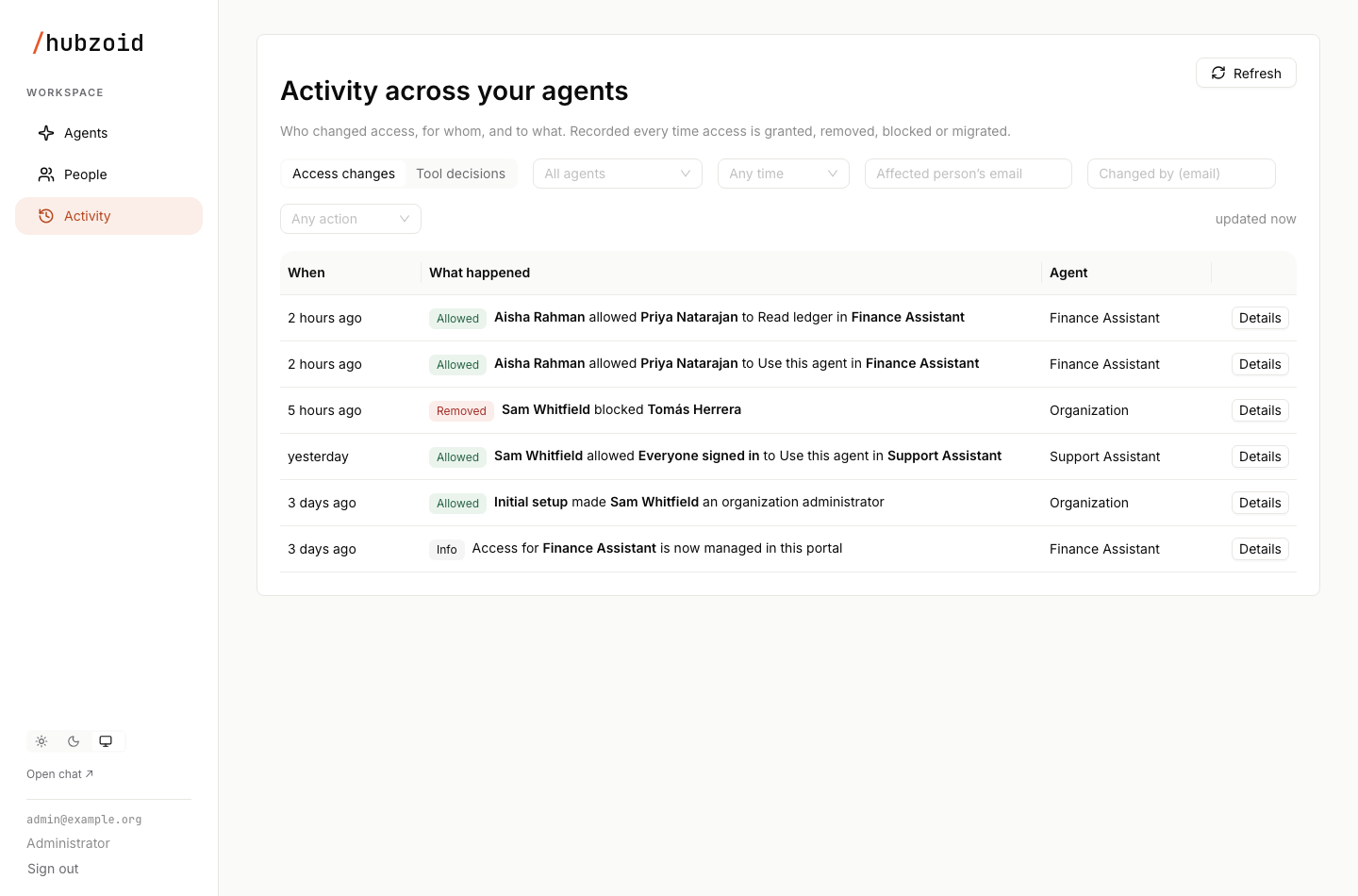
hubzoid auditare the record of who called what.
Decide who may connect
A valid key proves who someone is. The front door decides whether they may use this particular hub.
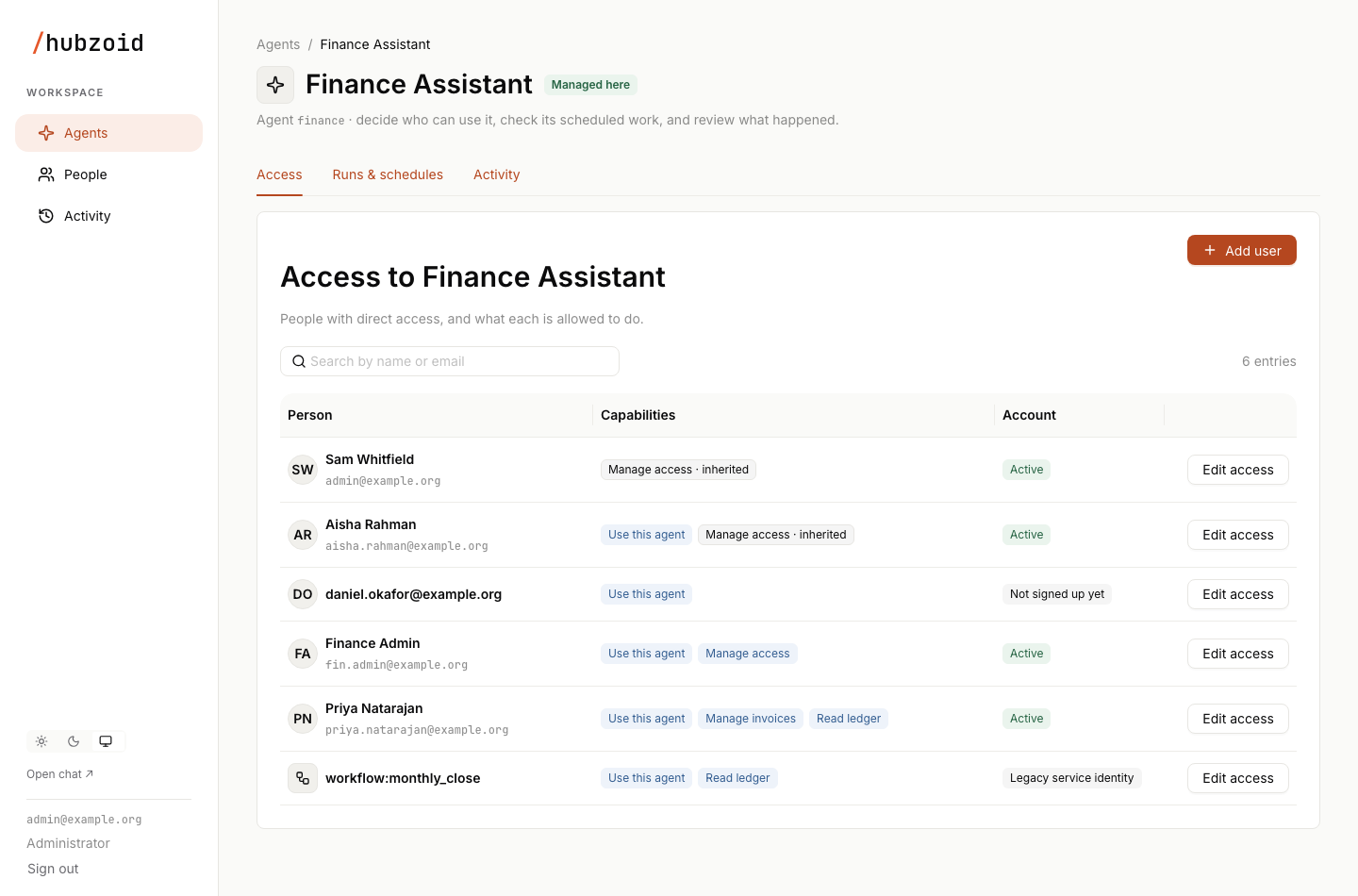
Once a hub's access is managed in the Console, the front door is the Use this agent grant, stored as use_hub. A person without it gets 401 and never sees a tool name. Access goes to named people. On the agent's Access tab, use Add user for someone new or Edit access for someone already listed, or grant it from the command line:
hubzoid grant asha@example.com use_hub ./stock-deskGranting any tool permission grants use_hub too. An Everyone signed in row carried over from a legacy hub also counts until an organization administrator removes it, and new access for everyone cannot be created. If the access store cannot be read, the call is refused rather than let through. MCP_ACCESS_GROUP is not consulted for these hubs.
What the assistant receives
Instructions
When the client connects, the MCP initialize response carries the hub's instructions: the body of AGENTS.md, the same text the hub's own agent follows. The server is named after the name: in AGENTS.md. Clients that support server instructions, such as Claude Code, add them to the assistant's context.
If AGENTS.md holds guidance meant only for the hub's own agent, or is long, give MCP clients a shorter version. mcp_instructions: wins when present:
---
name: Stock desk
mcp_instructions: |
  Stock and reorder knowledge for four store locations.
  Use read_knowledge for policies such as reorder-policy.
  Use grep_data for the daily stock exports in raw_data/.
---

You are the stock desk agent. ...
Tools
The assistant gets the same tool registry the chat agent uses, minus tools that only make sense inside a chat.
| Tools | Over MCP |
|---|---|
read_knowledge, list_knowledge, load_skill, list_skills, read_file, list_files, grep_data, current_time, render_jinja | Exposed |
http_get, web_search | Exposed unless turned off with HUBZOID_DISABLE_HTTP_GET or HUBZOID_DISABLE_WEB_SEARCH |
Your tools_local/ tools | Exposed |
Your restricted/ tools | Exposed only to people who may use them, and guarded on every call |
| Sub-agents | Offered as skills through load_skill. The hub does not run a second model for an MCP caller. |
write_artifact, list_artifacts, read_upload, read_upload_full | Not exposed. They need a chat's upload and download folders. |
Tools the hub uses from its own connectors/.mcp.json servers | Not passed through |
Every tool schema costs context in every connected client, so keep the exposed set focused. Restricted tools follow the rules in Restrict tools. The mcp surface is in the default HUBZOID_RESTRICTED_SURFACES list, because each caller signs in with their own key. If you set that variable, keep mcp in it.
The MCP connection keeps no conversation. The assistant holds its own history, and each call to the Hub stands alone.
Set up your client
Replace https://hub.example.com/mcp with your hub's MCP URL and stock_desk with any name you like.
claude mcp add --transport http stock_desk https://hub.example.com/mcp \
  --header "Authorization: Bearer sk-..."
Check the connection with claude mcp list, or /mcp inside a session. The command stores the header, key included, in Claude Code's configuration. Keep the default local scope or use --scope user. The project scope writes to a .mcp.json file meant for version control.
Test allowed and denied calls
Before handing the URL to a team, check both sides of the door with curl.
export STOCK_DESK_HUB_KEY=sk-...

curl -s https://hub.example.com/mcp \
  -H "Authorization: Bearer $STOCK_DESK_HUB_KEY" \
  -H "Content-Type: application/json" \
  -H "Accept: application/json, text/event-stream" \
  -d '{"jsonrpc": "2.0", "id": 1, "method": "tools/list"}'
The result may arrive wrapped in a server-sent data: line. It lists the tools this person may use. Then call one:
curl -s https://hub.example.com/mcp \
  -H "Authorization: Bearer $STOCK_DESK_HUB_KEY" \
  -H "Content-Type: application/json" \
  -H "Accept: application/json, text/event-stream" \
  -d '{"jsonrpc": "2.0", "id": 2, "method": "tools/call",
       "params": {"name": "read_knowledge", "arguments": {"name": "reorder-policy"}}}'
A restricted tool called by someone without its permission is refused with "isError": true and a message like this, and the attempt is recorded:
[access denied: 'ledger_lookup' requires the 'ledger' permission, which the current user does not have. This attempt was logged.]| Check | Expected result |
|---|---|
No Authorization header, or a made-up key | 401 |
A key from BRIDGE_API_KEYS | 401 |
A valid key from someone without Use this agent (or outside MCP_ACCESS_GROUP) | 401 |
| A valid key from someone with access | tools/list returns the unrestricted tools |
| A restricted tool the person lacks | Missing from tools/list, and tools/call returns isError with an access denied message |
| The key deleted in the web chat | 401 on the next call |
| A group or grant changed | Applies on the next call, with no reconnect |
Review decisions with hubzoid audit, filtered to refusals or one person:
hubzoid audit ./stock-desk --denied
hubzoid audit ./stock-desk --user asha@example.com
The same decisions appear on the Console's Activity page under Tool decisions, with the channel mcp.
Operational notes
- The endpoint is stateless, so it works behind a load balancer and across bridge restarts.
- MCP calls run the hub's tools on the hub's machine, with the hub's own credentials. Keep the credentials a tool needs in
restricted/.env. The file-reading tools refuse therestricted/folder, so no caller can read it. - The hub spends no model tokens on MCP calls. The assistant's own model does the reasoning.
Next steps
Restrict tools
Put a sensitive tool behind a permission before exposing the hub over MCP.
Agents and access
Grant Use this agent and tool permissions to people in the Console.
Gateway
Serve several hubs, each with its own MCP path, behind one front door.
Identity and access
How keys, grants, groups and surfaces combine into one decision.
Restrict a tool
Put a sensitive tool behind a permission, keep its credentials in restricted/.env, grant it to people and workflow accounts in the Console or CLI and confirm every call in Activity.
Web chat
The browser chat app every hub serves on port 3080, with sign-in, the Hub's agent and tools, uploads, file downloads, branding and chat history.