Part 1 · Lesson 3 of 9 · 3:23 video
Tools, connectors and MCP: how AI agents take action
Describe a tool with clear inputs, then see how an agent calls it.
- Before you start
- Python to run the optional example.
- Lesson files
Course content Lesson 3 of 9
- 01Why AI agents need a harness, and how it works
- 02Knowledge and skills: how AI agents use your business knowledge
- 03Tools, connectors and MCP: how AI agents take action
- 04Three types of AI agents, one brain
- 05The brain in detail: build your first hub with Hubzoid
- 06The Ask agent: give your team an AI agent in chat
- 07The daily report: an AI agent workflow on a schedule
- 08Your own Claude, connected through MCP
- 09Access and telemetry: run AI agents for a whole team
Lesson notes
The ideas from the video, with examples.
A tool is a described function
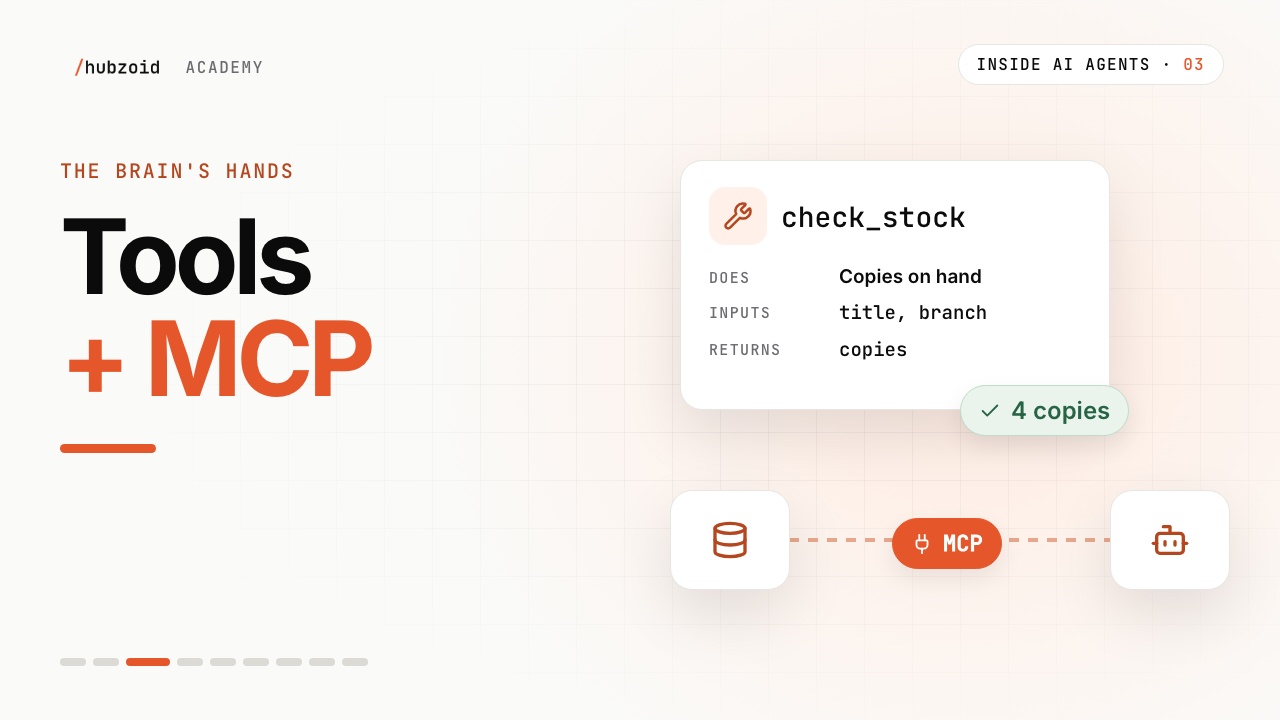
The stock check from the video, in plain Python. Four parts become the tool the model sees.
check_stock.py import csv from pathlib import Path STOCK = Path(__file__).with_name("stock.csv") def check_stock(title: str, branch: str) -> dict: """Copies on hand for one title at one branch.""" with STOCK.open(newline="") as f: for row in csv.DictReader(f): if row["title"] == title and row["branch"] == branch: return {"copies": int(row["copies"]), "counted_at": row["counted_at"]} return {"error": "No stock record for that title and branch."}Part Comes from Here Name the function name check_stockDescription the docstring Copies on hand for one title at one branch. Inputs the typed parameters title: str,branch: strResult what it returns copiesandcounted_at, or anerrorWhat the model is shown
The harness turns those parts into a schema:
The tool, as the model sees it { "name": "check_stock", "description": "Copies on hand for one title at one branch.", "parameters": { "type": "object", "properties": { "title": { "type": "string" }, "branch": { "type": "string" } }, "required": ["title", "branch"] } }If the model leaves out
branch, the request fails the check and the model is told. The model only asks. The harness runs only listed tools, with inputs that fit.Connectors: tools from other systems
Many systems publish tools through an MCP server. The harness connects, reads the tool list, and calls them like its own. In a hub, an administrator adds remote servers in the Console, and servers that belong to the hub folder live in one file.
connectors/.mcp.json { "mcpServers": { "github": { "command": "npx", "args": ["@modelcontextprotocol/server-github"], "env": { "GITHUB_PERSONAL_ACCESS_TOKEN": "${GH_TOKEN}" } }, "sales": { "transport": "streamable-http", "url": "https://sales.example.com/mcp", "headers": { "Authorization": "Bearer ${SALES_TOKEN}" } } } }${GH_TOKEN}and${SALES_TOKEN}come from the hub's.env, so tokens never sit in this file. The first server runs locally, the second is remote.Who a tool acts as
Connection Acts as Good for A server in connectors/.mcp.json, or a Console connector with a shared keyOne account for the whole hub Stock, sales and other shop-wide data A Console connector where each person signs in Each person's own login Email, calendars and files, where people should see only their own Some tools should run only for certain people. Lesson 5 restricts the invoice check, and lesson 9 grants it.
Exercise
Try it: run the tool yourself
Download both files below into one folder:
check_stock.pyandstock.csv.Run it.
Terminal python3 check_stock.pyWhat you should see {'copies': 4, 'counted_at': '2026-09-27 10:42'}Change the question to Paper Moons at Station Road. Expect 2 copies.
Write your own for one lookup your team does by hand: a clear name, a one-line docstring, typed inputs, a small result. Your AI assistant can write it with you.
If you're stuck
It says: No stock record for that title and branch
Titles and branches must match the CSV exactly, including capital letters. Open stock.csv to see the names it holds.
The agent never calls my tool
The model chooses by the docstring. Say what the tool returns and when it helps, and name the action: check_stock, not helper.
Should a tool raise an error or return one?
Return a short error, as check_stock does, so the model can ask for the missing detail instead of failing.
A remote server in .mcp.json connects but its tools never load
Remote servers in the file default to SSE. For Streamable HTTP, set "transport": "streamable-http" as above, then run hubzoid doctor.
Still stuck? Run hubzoid doctor on your hub, then search GitHub issues (opens in a new tab) with your version and the full error. Setting it up for a team? Request a demo.
Go deeper
- Tools and connectorsLocal tools, shared connectors and personal connections in Hubzoid.
- Built-in toolsThe tools every hub has before you add your own.
- MCP: tools (opens in a new tab)How an MCP server lists and runs tools.
- MCP servers (opens in a new tab)Reference and community servers to connect.
Transcript and what the video shows
Intro
Welcome back to Inside AI Agents. Last time, knowledge and skills, what the brain knows. This time, how it acts.
Knowing isn't doing
It's a busy Saturday at the Riverside branch. Sam asks the agent: how many copies of Paper Moons do we have, right now?
The brain knows the returns policy. It knows how to write the daily report. But it doesn't know today's stock. That number lives in the shop's sales system, and it changes with every sale.
On its own, a model can only guess. To get the real number, the brain needs hands.
What a tool is
A tool is a small piece of real code. It comes with four parts the model can read. A name. Check stock. A description. The copies on hand, for one title, at one branch. The inputs it needs. A title, and a branch. And what it gives back. A number, and when it was counted.
The round trip
Now the model has what it needs. It reads the tool list, and writes a request. Check stock. Paper Moons. Riverside. The harness checks it. Is this tool on the list? Are the inputs complete? Then it runs the code, and passes back the answer. Four copies, counted two minutes ago. Sam gets a real number, not a guess.
Code decides
If an input is missing, the harness sends back a clear error, and the model asks Sam which branch.
And if a tool isn't on the list, the model simply can't use it. So what an agent can actually do is decided in code, not in the prompt.
Connectors
Wren and Page runs on more than one system. The sales system. The accounting software. Email. The shared drive. Writing tools for every one of them, by hand, is a lot of work.
That's where connectors come in. Many systems now offer an MCP server. MCP is an open standard for sharing tools with AI agents. The server lists its tools, with names, descriptions and inputs. The harness connects, reads that list, and calls those tools just like its own.
Because it's a standard, any agent that speaks MCP can use the same connector. One plug, many agents.
Who a tool acts as
Every tool also acts as someone. The stock check can use the shop's own account, the same for everyone. But an email connector should use each person's own login. When Maya asks, it reads Maya's inbox, and only what Maya could see.
And a tool only runs for people who have access to it. We'll come back to that.
The brain's hands
So that's how an agent acts. Tools are code, described so the model can ask for them. Connectors bring in tools from other systems, through MCP. The model asks. Your code decides what actually happens.
Knowledge and skills are what it knows. Tools and connectors are its hands.
Try it and next
Try this. Write one small tool, as a Python function. Give it a clear name, a one-line docstring saying what it does, typed inputs, and a result it returns. If you don't write code, ask your AI assistant to write it with you. That's a tool. In part two, we'll hand it to an agent.
Next time, three types of agents, and the one brain they share.
What the video shows
- The example tool has a name, a short description, typed inputs and a returned stock result.
- Connectors expose tools from another service. Identity matters when a tool reaches someone’s account.
 Up next: lesson 4, 3:22Three types of AI agents, one brain